
Feedback1 Edge add-on
Feedback1 Edge add-on for customer feedback capture
For Feedback1 teammates: sign in, pick a product and CRM contact, and submit feedback or upvote a feature on behalf of that contact. Optional screenshot of the visible tab. Not a public end-user widget.
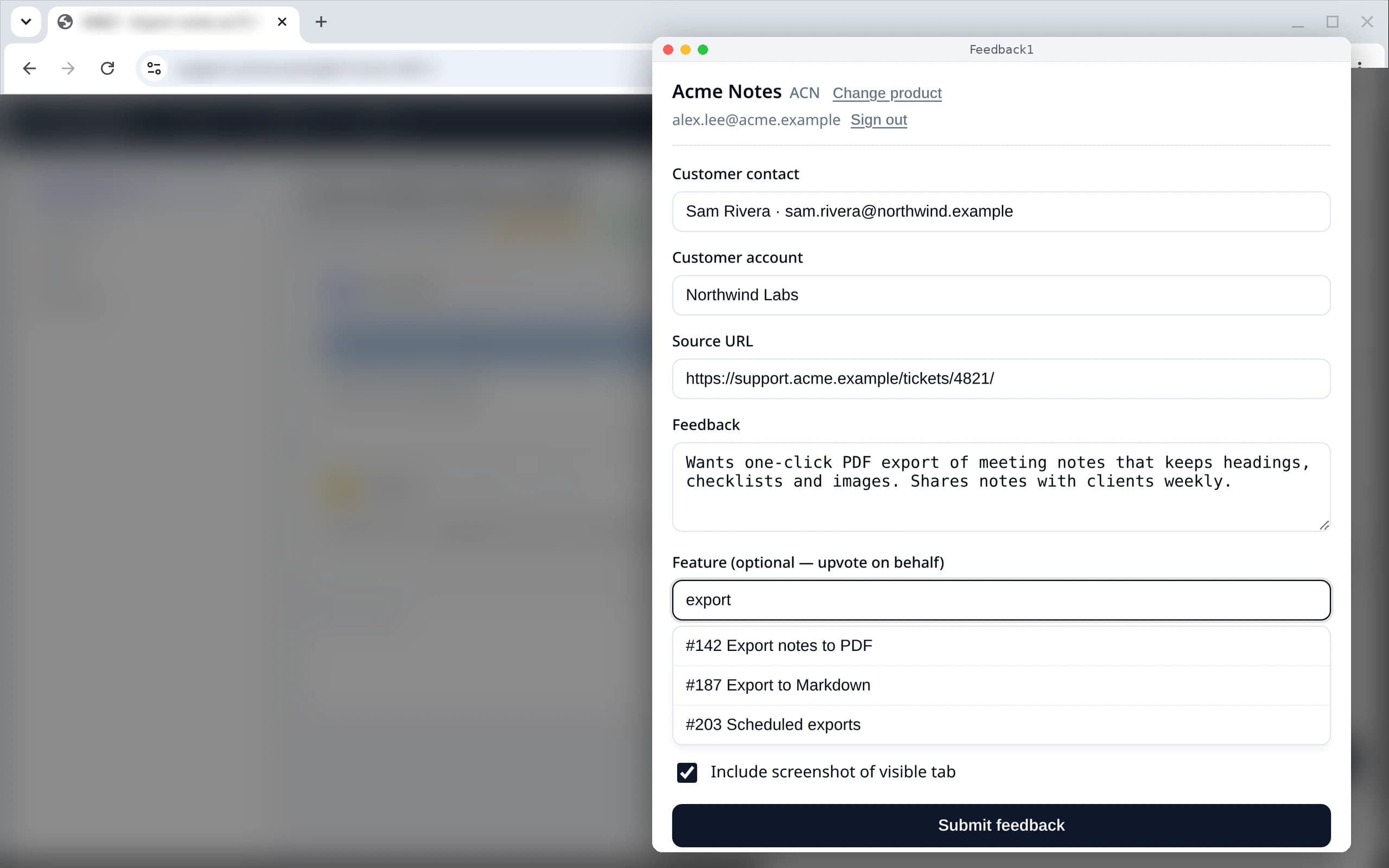
Staff capture while you browse
Built for CS, sales, and product folks who hear requests on calls, in tickets, or on customer sites.
One click from Edge
Open the capture panel from the toolbar. It stays open while you work so you do not lose draft fields.
- Sign in with your Feedback1 account
- Choose product and CRM contact
- Link to the source URL automatically
- Optional visible-tab screenshot
- Submit to the same inbox as widget and email
On behalf of CRM contacts
Tie each submission to a contact and account so revenue context stays with the quote.
- Search contacts and accounts
- Upvote a feature on behalf of the contact
- Channel marked as Edge add-on in the inbox
- Works with production Feedback1 workspaces
Scope
This extension is for signed-in Feedback1 staff, not anonymous visitors. It does not replace the embeddable feedback widget or public portal.
- Requires a Feedback1 login
- Not for customer self-serve capture
- Pair with the embeddable widget for in-app requests
Why capture in the browser
Requests show up on customer sites, in demos, and in support tools. Copy-paste into a doc loses the URL and the contact. The extension keeps source page, contact, and quote in one inbox entry.
It uses the same product workspace as your widget, portal, and email forwarding. Themes, prioritization, and roadmap stay in sync.
Who it is for
Customer success, sales, and product teammates who already use Feedback1 and need to log what a specific contact said without switching apps.
Related: feedback widget, prioritization, and feedback portal.
Frequently asked questions
Who can use the Feedback1 Edge add-on?
Signed-in Feedback1 teammates with access to the product workspace. It captures feedback on behalf of CRM contacts, not anonymous end users.
Is this the same as the embeddable feedback widget?
No. The widget is for visitors on your site. The Edge add-on is for your team to log what a contact said while browsing, with optional screenshot and CRM linkage.
Does it work with production Feedback1?
Yes. Sign in through app.feedback1.ai, approve the connection once, then capture against your live products and contacts.
Can customers install it?
It is meant for internal staff capture. Customers should use your portal or in-app widget unless you explicitly ask them to use a shared staff workflow.
Feedback1 Edge add-on
Log what contacts said, where they said it
Staff capture for Feedback1 workspaces. Flat workspace pricing for the product; install the extension when the listing is available.